

HOTEL GUIDE
Staying Connected in Thailand: The Complete Guide to SIMs, eSIMs & Pocket WiFi
Clear, practical steps for travelers on buying and registering a Thailand SIM card, using eSIMs, pocket Wi‑Fi and roaming, plus tips for tourists, digital nomads and long‑stay visitors.
Choosing how to stay online in Thailand is one of the first practical decisions after you land. This guide explains how to get a Thailand SIM card (physical or eSIM), where to buy and register one, how pocket Wi‑Fi and roaming compare, and which option suits tourists, digital nomads and long‑stay visitors.
Key Takeaways
- Buy and register a local SIM at the airport or in‑city shop (passport and biometric verification are required).
- eSIMs are convenient for short stays and data-only needs; native carrier eSIMs can offer a Thai number but check verification rules.
- Choose pocket Wi‑Fi for groups or non-eSIM devices; use roaming only for short transitions or when keeping your home number is critical.
Quick overview: how mobile connectivity in Thailand works
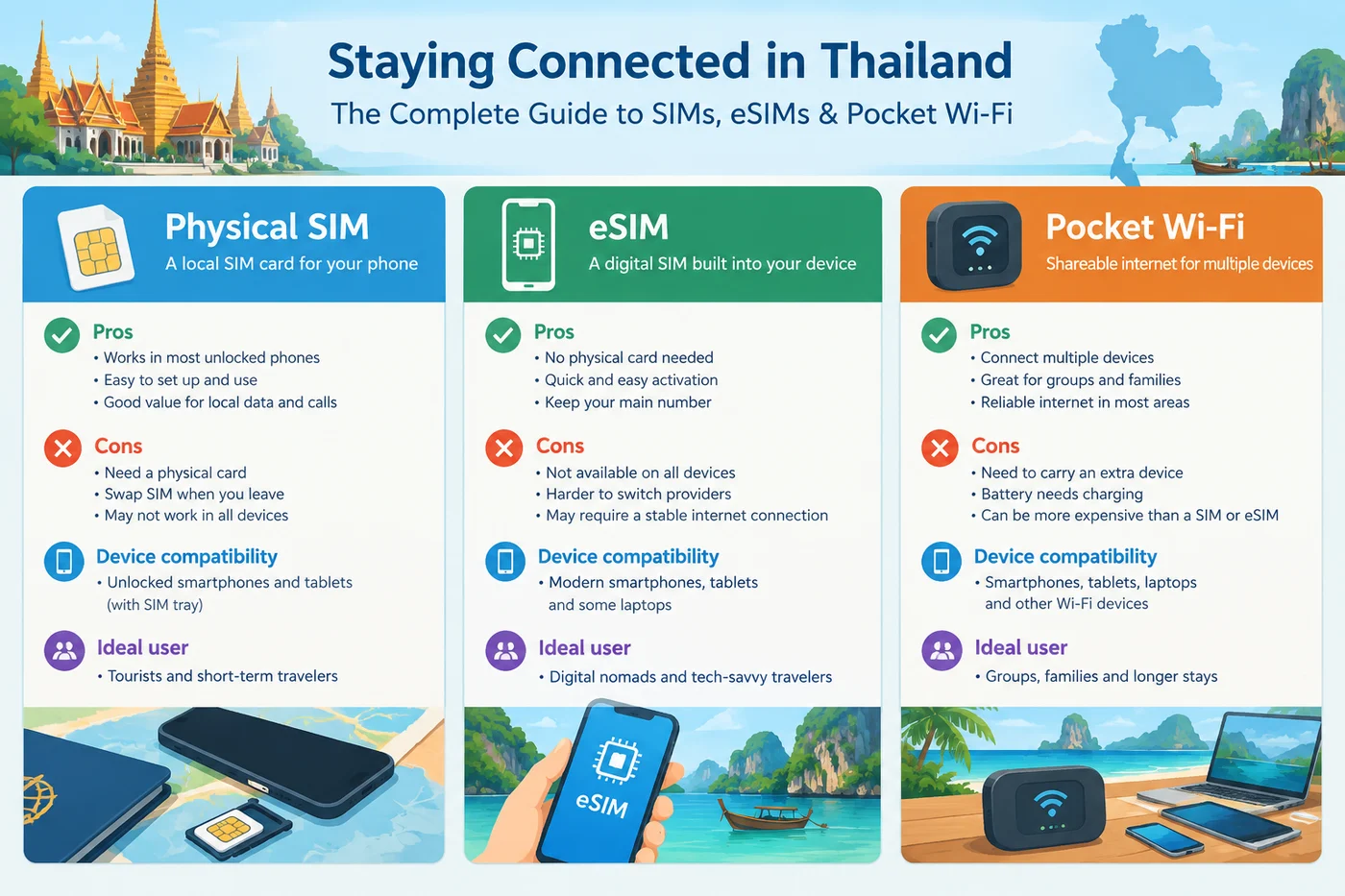
Thailand’s main consumer brands are AIS, TrueMove H and dtac (now consolidated under True Corporation). Each sells tourist SIMs and eSIMs through airport counters, operator shops and partner resellers. Options are: physical SIM (prepaid), carrier eSIM (sometimes with a Thai number) and third‑party data eSIMs (often data‑only). Rental pocket Wi‑Fi is another common choice for groups or devices without eSIM support.
Thailand SIM card: Choosing between SIM, eSIM and pocket Wi‑Fi
Pick based on device compatibility and trip type. Physical SIMs are best if you need voice/SMS and long‑term top‑ups; eSIMs suit modern unlocked phones and are fastest to activate for data‑only use; pocket Wi‑Fi is ideal for groups or cameras/tablets that can’t use SIMs. For digital nomads, a local physical or carrier eSIM with reliable top‑up methods and a local phone number usually works best; tourists on short trips often prefer third‑party eSIMs or airport tourist SIM bundles.
Where and how to buy: arrival, in‑city shops and prearrival options
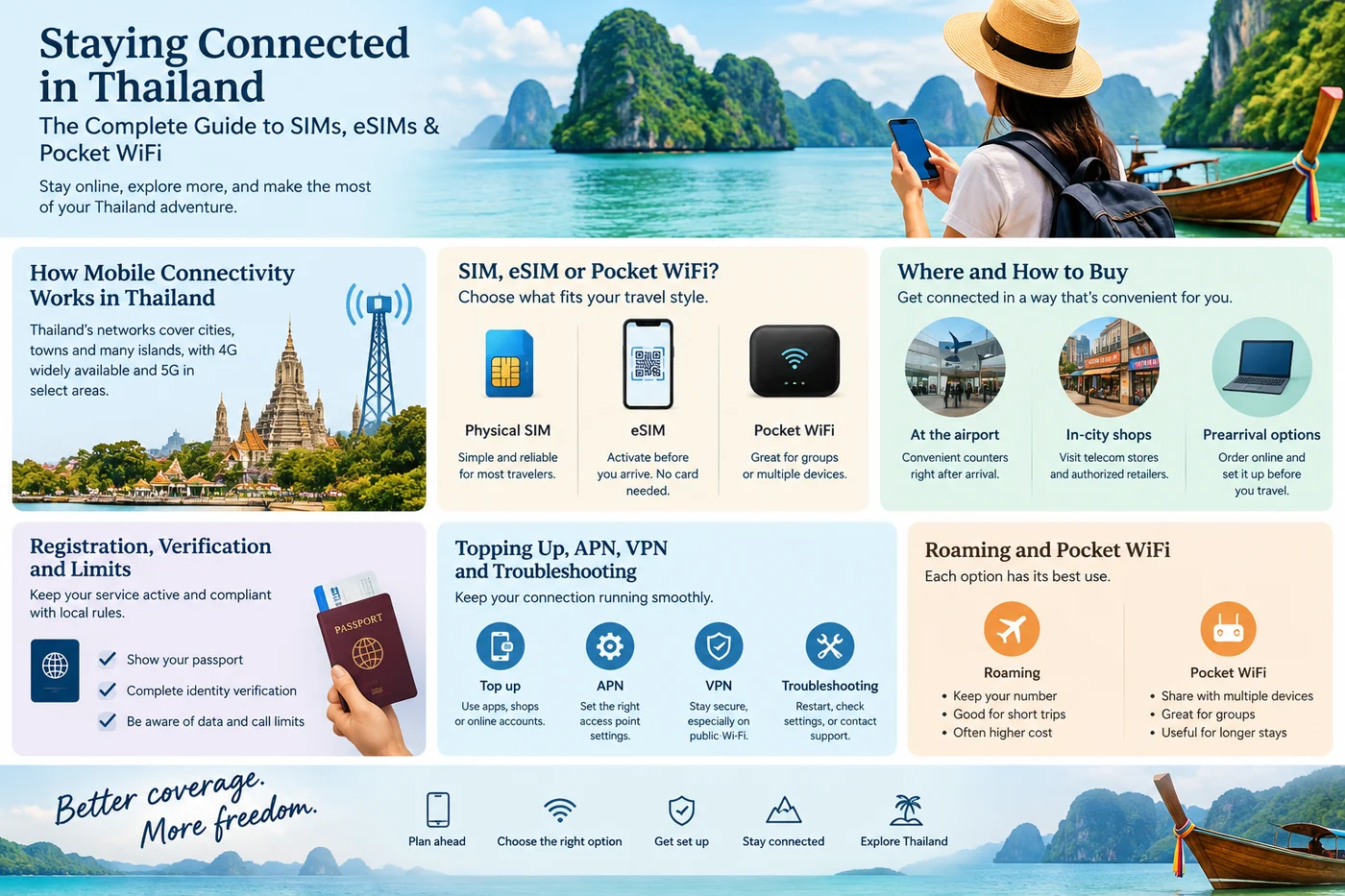
Airport counters at Suvarnabhumi (BKK) and Don Mueang (DMK) and staffed operator kiosks sell and register SIMs immediately but can be pricier and busy. In‑city carrier stores and authorised resellers give the same products with fewer queues. You can also pre‑order eSIMs or SIM pickup through marketplaces (many resellers like Klook or eSIM marketplaces list Thailand products). Remember: airport staff can complete passport-based registration on the spot.
Registration, verification and limits
Thailand requires real‑name SIM registration. Expect to show your passport and complete biometric liveness checks for some activations. Operators and NBTC guidance indicate limits on the number of prepaid SIMs a foreigner may register with each operator — these rules can change, so verify current instructions before travel. Some carrier eSIMs or reseller products are data‑only and require less in‑person verification, but native operator eSIMs that include a Thai number may require passport verification in‑country.
Topping up, APN, VPN and troubleshooting common issues
Top up via carrier apps, operator websites, authorised kiosks and convenience stores — carrier apps also let you monitor balance and buy add‑ons. If data doesn’t work, check your APN in phone settings (operators publish APN values) and confirm your plan is active. Use a VPN for banking or public Wi‑Fi security. If an eSIM won’t activate, verify your phone is unlocked and eSIM-compatible; some activations require scanner or carrier support at a shop. For persistent problems, visit an operator store with your passport.
Roaming and pocket Wi‑Fi: when to use each
Roaming add‑ons from your home operator are convenient for short hops but can be costly. Buy a local Thailand SIM card for better local rates and data. Use pocket Wi‑Fi when you need a shared connection for multiple devices, wish to avoid switching SIMs, or have devices that don’t support eSIM. For long stays or heavy data use, a local carrier SIM or native eSIM generally offers the best value and speeds.
Practical Tips
Before departure, check that your phone is unlocked and supports the eSIM standard if you plan to use one. Keep a clear digital photo of your passport page for quicker registration. If you need a Thai phone number for banking or messaging, prefer a native carrier SIM/eSIM and confirm any in‑person verification requirement. For data-only short trips, compare reseller eSIMs (Airalo/Klook/etc.) for instant delivery — but double-check whether they provide voice/SMS. For speed checks and local coverage maps, review AIS and True pages and test speeds in your destination city.
Important Considerations
Rules and product details change frequently: package allowances, 'unlimited' fair‑use caps, and verification requirements can be updated without notice. Do not assume reseller eSIMs include voice/SMS or a Thai number. Verify current NBTC and operator guidance on registration limits and biometric checks before you travel.
Planning more of your trip? Browse our
Thailand Travel Guides
for more practical Thailand travel information.
Final Thoughts
There’s no single "best" choice for everyone: pick the option that matches your device, trip length and need for a local number. Airport counters are the fastest route on arrival; eSIMs save time for data-only travelers; pocket Wi‑Fi is best for groups. Check official carrier pages and NBTC notices for the latest rules, and keep your passport handy for registration.
Sources & Further Reading
- AIS – Tourist plans and eSIM info
- True – Prepaid tourist SIMs and eSIMs
- National Broadcasting and Telecommunications Commission (NBTC) – Notices
- Klook – Pocket Wi‑Fi rental and eSIM listings
Transport schedules, fares and operating rules can change. Always verify time-sensitive details with the official operator before travel.